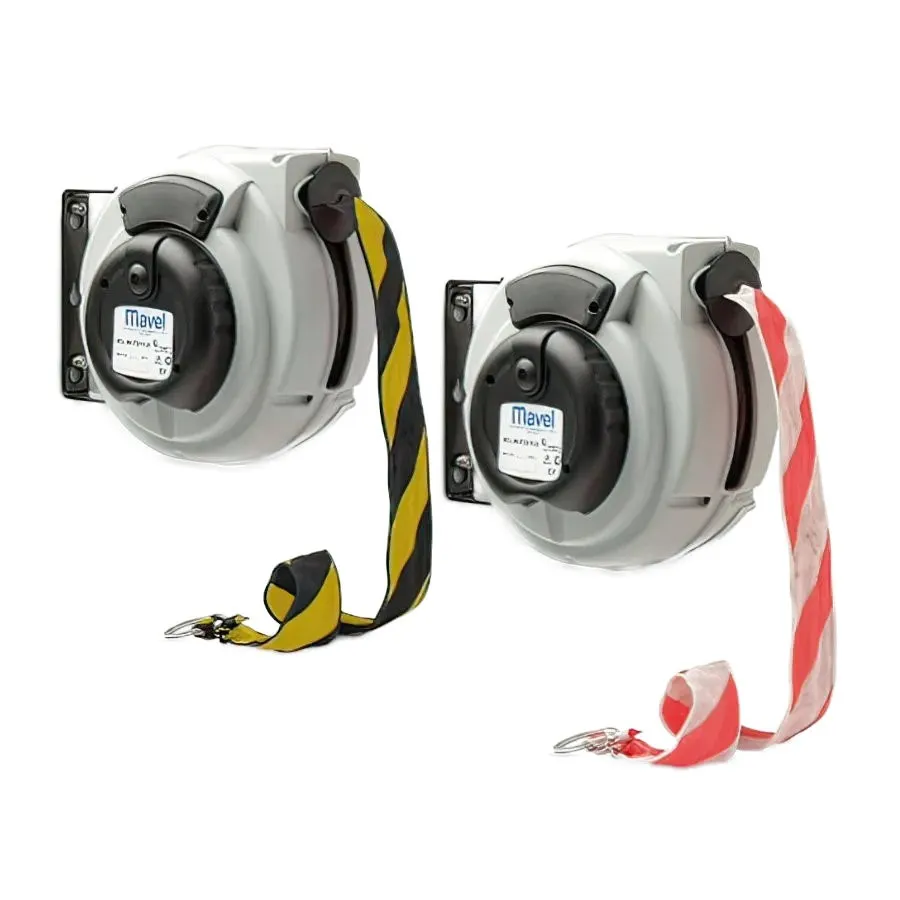

Roll Master Plus – Warning Tape Reel

Warning tape reels are ideally suited to industrial and commercial situations where a safety barrier is required to prevent people from entering an unsafe or restricted area. The reels can be simply mounted on a wall, the barrier tape then can be pulled across the danger zone and finally hooked on the opposite wall. The tape can then be easily and quickly retracted when access is required. It can also be installed in areas that need cordoning off for maintenance or wherever access must be denied.

These reels come complete with a metal ring for hooking and they can also be equipped with the new patented SLOWMOTION system, which allows a safe and controlled rewinding of the tape.

OPTIONAL

Code

Colore Banda

Weight

Dim. (cm)

Pallet

811700

16 m

2,7 Kg

29 × 29 x 20,5

88 pz

811720

16 m

2,7 Kg

29 × 29 x 20,5

88 pz

Details/Optional

/* ========================================================================== 1. PULIZIA INFRASTRUTTURA STRUTTURALE (HEADER, MENU, FOOTER SITE) ========================================================================== */ #main-header, #top-header, #main-footer, header, footer, .et_pb_menu, .nav-wrapper { display: none !important; } /* ========================================================================== 2. ABBATTIMENTO TOTALE DELLA DATA (APPROCCIO AD ALTO IMPATTO) ========================================================================== */ /* Se il plugin ignora il display:none, questo blocco rimpicciolisce la data a 0 pixel, la rende trasparente e la sposta fuori dal foglio A4 */ .post-meta, .et_pb_title_meta_container, .entry-meta, .published, time, .pf-date, .pf-meta, #pf-meta, .print-meta, #pf-print-date, #pf-date-time, [class*="meta"], [id*="meta"], [class*="date"], [id*="date"] { display: none !important; visibility: hidden !important; opacity: 0 !important; font-size: 0 !important; line-height: 0 !important; height: 0 !important; width: 0 !important; margin: 0 !important; padding: 0 !important; position: absolute !important; top: -9999px !important; left: -9999px !important; } /* ========================================================================== 3. ELIMINAZIONE ELEMENTI EXTRA SULLA PAGINA PRODOTTO MAVEL ========================================================================== */ /* Nasconde descrizioni, testi generici e l'elenco puntato dei modelli della categoria */ .et_pb_text p, .et_pb_post_content p, .entry-content p, .description p, .et_pb_post_content ul, .entry-content ul, .et_pb_text ul, ul li, #prodotti-lights, .prodotti-lights, .related-products, #sidebar, .et_pb_sidebar { display: none !important; } /* Eliminazione dei titoli e delle righe di download (Schede e Ricambi) */ a[href*="download"], a[href*=".pdf"], .et_pb_button, .wptb-stone-reloaded a, h4, h5, .et_pb_text h4, .et_pb_text h5, div:has(> a[href*="download"]), p:has(> a[href*="download"]) { display: none !important; } /* Forza l'esclusione totale dal PDF delle tabelle e righe marcate in JavaScript */ .mavel-hidden-block, .mavel-hidden-row, tr.print-no-print, div.print-no-print, h2.print-no-print, h3.print-no-print, h4.print-no-print, p.print-no-print { display: none !important; visibility: hidden !important; } /* ========================================================================== 4. BLOCCO E RE-STYLING DEI TITOLI ISTITUZIONALI ========================================================================== */ h1, h1.entry-title, .entry-title { display: block !important; visibility: visible !important; color: #005a9c !important; font-size: 26px !important; font-weight: bold !important; margin-top: 10px !important; margin-bottom: 20px !important; } /* ========================================================================== 5. GESTIONE DISEGNO TECNICO (LARGHEZZA 80%, CENTRATURA E CUSCINETTO A4) ========================================================================== */ .et_pb_module.et_pb_image img, .entry-content img, .wptb-preview-table img { max-width: 100% !important; } img[src*="disegno"], img[src*="tecnico"], img[src*="schema"], .et_pb_image_container img:nth-of-type(2), .mavel-disegno-tecnico img { width: 80% !important; max-width: 80% !important; display: block !important; margin-left: auto !important; margin-right: auto !important; height: auto !important; /* AUMENTO DELLO SPAZIO SOTTO: Spinge "Dettagli/Optional" sulla seconda pagina */ margin-bottom: 300px !important; } /* ========================================================================== 6. DISTENSIONE ORIZZONTALE E ALLINEAMENTO DELLE COLONNE IN A4 ========================================================================== */ /* Forza l'intera tabella a distendersi occupando tutto lo spazio A4 disponibile */ .wptb-table-container, .wptb-table-container table, table.wptb-preview-table { width: 100% !important; display: table !important; table-layout: fixed !important; /* Impedisce alle colonne di stringersi in verticale */ border-collapse: collapse !important; margin-top: 20px !important; } /* Forza la riga di intestazione e la riga del codice a disporsi come elementi tabellari orizzontali */ .wptb-table-container thead, .wptb-table-container tbody { display: table-row-group !important; } .wptb-table-container tr { display: table-row !important; width: 100% !important; } /* Forza l'allineamento perfetto cella per cella (Intestazione sopra il rispettivo valore) */ .wptb-table-container th, .wptb-table-container td, table.wptb-preview-table th, table.wptb-preview-table td { display: table-cell !important; padding: 10px 6px !important; font-size: 11px !important; text-align: center !important; /* Centra i valori sotto ai titoli delle colonne */ border-bottom: 1px solid #e0e0e0 !important; white-space: nowrap !important; /* Impedisce ai testi corti (es. "6 bar", "20 m") di spezzarsi a metà */ } /* Allinea a sinistra solo la prima colonna (Codice Articolo) e le garantisce lo spazio corretto */ .wptb-table-container th:first-child, .wptb-table-container td:first-child { text-align: left !important; width: 16% !important; } /* Applica il blu istituzionale Mavel allo sfondo della testata per evidenziare le voci */ .wptb-table-container th, .wptb-table-container thead tr:first-child td { background-color: #005a9c !important; color: #ffffff !important; font-weight: bold !important; } /* ========================================================================== ELIMINAZIONE COMPLETA RIGHE/SPAZI VUOTI NELLA TABELLA FILTRATA ========================================================================== */ /* Quando lo script dell'head nasconde le righe, questa regola ne azzera completamente l'altezza, la visibilità dei bordi e l'impatto sul foglio A4 */ tr.mavel-hidden-row, tr.print-no-print, tr[style*="display: none"], tr[style*="display:none"] { display: none !important; visibility: hidden !important; line-height: 0 !important; height: 0 !important; max-height: 0 !important; padding: 0 !important; margin: 0 !important; border: none !important; } /* Rimuove i bordi e i margini residui dalle celle interne delle righe nascoste */ tr.mavel-hidden-row td, tr.print-no-print td, tr[style*="display: none"] td, tr[style*="display:none"] td { display: none !important; padding: 0 !important; margin: 0 !important; height: 0 !important; border: none !important; } /* Ripristina la linea di separazione pulita sotto l'intestazione e sotto l'unica riga attiva */ .wptb-table-container thead tr:first-child th, .wptb-table-container thead tr:first-child td { border-bottom: 2px solid #005a9c !important; /* Riga di separazione blu sotto l'intestazione */ } .wptb-table-container tbody tr:not(.print-no-print):not(.mavel-hidden-row) td { border-bottom: 1px solid #e0e0e0 !important; /* Riga pulita sotto i dati selezionati */ } /* ========================================================================== 7. INGRANDIMENTO AL 400% E RI-AFFIANCAMENTO ORIZZONTALE DEL PERMALINK ========================================================================== */ /* Forza il contenitore principale a mantenere gli elementi sulla stessa linea */ #pf-print-permalink, .pf-permalink-container { display: block !important; white-space: nowrap !important; /* Impedisce tassativamente al testo di andare a capo */ margin-bottom: 20px !important; /* Spazio sotto prima del titolo dell'articolo */ } /* Applica l'ingrandimento al 400% (64px) alla favicon-logo Mavel */ #pf-print-permalink img, .pf-domain-icon, img[src*="favicon"], #pf-print-permalink img:first-child { display: inline-block !important; /* Mantiene l'allineamento sulla stessa riga */ box-sizing: border-box !important; /* Dimensioni fisse al 400% (da 16px a 64px per lato) */ width: 64px !important; height: 64px !important; max-width: 64px !important; max-height: 64px !important; margin-left: 0 !important; margin-right: 12px !important; /* Distanza tra il logo a 64px e l'inizio dell'URL */ margin-bottom: 0px !important; vertical-align: middle !important; /* Centra il logo in asse con il testo accanto */ } /* Configura il testo del permalink ("mavel.it/...") affiancato al logo */ #pf-print-permalink a, .pf-permalink, #pf-print-permalink span { display: inline-block !important; /* Forza il testo a rimanere di fianco */ vertical-align: middle !important; /* Lo centra perfettamente a metà altezza del logo */ font-size: 14px !important; font-family: 'Libre Franklin', sans-serif !important; line-height: 64px !important; /* Pari all'altezza del logo (64px) per una centratura millimetrica */ color: #5e5e5e !important; } /* ========================================================================== 8. AUTOMATIZZAZIONE SALTO PAGINA INTERO BLOCCO "DETTAGLI/OPTIONAL" ========================================================================== */ /* Intercetta qualsiasi titolo h2, h3 o testo che contiene o inizia con la sezione Dettagli */ h2:has-text("Dettagli"), h3:has-text("Dettagli"), h2:has-text("Dettagli/Optional"), h3:has-text("Dettagli/Optional"), .et_pb_text:has(h2), .et_pb_text:has(h3) { /* Se i selettori sopra non bastano nel tuo ambiente specifico, applichiamo la regola direttamente sulla struttura del builder */ } /* Soluzione universale basata sulla struttura nativa di Print Friendly: Forza il salto pagina prima del titolo */ h2, h3 { page-break-inside: avoid !important; /* Impedisce al titolo di spezzarsi a metà */ } /* Applichiamo il salto pagina chirurgico cercando l'elemento specifico */ *[class*="et_pb_text"]:has(h2), *[class*="et_pb_text"]:has(h3), h2, h3 { /* Nota: Questo blocco sotto si attiva solo se l'elemento è il titolo dei dettagli */ } /* Alternativa standard ad alta compatibilità per il motore di Print Friendly: */ div.et_pb_text:has(> div > h2), div.et_pb_text:has(> div > p > strong) { /* Riconosce la struttura interna di Divi */ } /* ECCO IL CODICE DEFINITIVO DA INCOLLARE NELLA SEZIONE 8: */ h2, h3, .et_pb_text h2, .et_pb_text h3 { /* Applica una regola di safe-break globale per evitare titoli orfani a fine pagina */ break-after: avoid !important; page-break-after: avoid !important; } /* Siccome l'intestazione nell'HTML è un titolo preceduto da una classe di testo Divi, diciamo al motore di stampa di non lasciarlo mai da solo. */ .et_pb_module.et_pb_text:has(h2), .et_pb_module.et_pb_text:has(h3) { page-break-inside: avoid !important; break-inside: avoid !important; }